
This dashboard consists of the following widgets:
Widget Name |
Description |
|---|---|
Top 10 Failed User Authentication |
The top ten failed user authentication due to multiple failed attempts or for the F5 Load Balancer system to process a high volume of invalid credential authentication requests. |
Top 10 User Agent by SessionID |
The top ten user agents such as web browsers, media players or plug-ins to get onto the internet and access online content based on a session ID that a Web site’s server assigns a specific user agent for the duration of that user’s visit (session). |
Failed User Authentication |
The user authentication failed or denied during login based on log timestamp, user, host, session ID and message. |
User Agent Details - List |
A list of user agent details such as which browser is being used, what version and on which operating system based on log timestamp, user agent, device name, device ID, session ID and message. |
Top 10 User vs SessionID |
The top ten users assigned a session ID by a server to identify and track user activity. |
Top 10 DeviceID vs SessionID |
The top ten device ID associated with a device from which a user sends a browsing request to the web server and a session ID that allows those users to be identified on a website and assigned to their session. |
Top 10 User that Doesn’t Exist |
The top ten users whose account may have been permanently deleted because of inactivity. As a result, those users do not exist. A registered user list should be made for this dashboard to work correctly. REGISTERED_USERS should contain all registered users. |
Top 10 Successful User Authentication |
The top ten successful user authentication by F5 load balancer that verified a user’s session ID allowing them access to an online service or connected device. |
Successful vs Failed User Authentication |
The count of user authentication that is failed, denied or successful. |
Session Details - List |
A list of session details provides a holistic view of the performance metrics of the selected session based on log timestamp, device ID, event category, session ID, user agent and message. It helps the administrator correlate available bandwidth’s and network latency’s impact on session score. |
Number of Unique External Devices |
The number of user agents identified as unique external devices. |
Top 10 Distinct DeviceID per User Agent |
The top ten distinct device ID in the user agent gives information about the actual device. It allows the administrator to identify browsers and devices. |
Time Trend Count |
A count on the dynamic view of F5 load balancer that can help forecast future threats. |
File Access Error |
The error occurred when a file access session request does not meet the configured access policy item for server-side or client-side checks. The administrator can review the access policy configuration and the affected user device. |
This dashboard consists of the following widgets:
Widget Name |
Description |
|---|---|
Trend of Attack |
The trend of web application’s threat types such as web scraping, web injection, brute force and JSON web threats counted hourly. |
Top 10 Attacks Based on Geolocation |
Entails web application attacks such as path traversal and local file inclusion analyzed through its countrywide geolocation. It allows the administrator to identify where threats originate. |
Top Attacking Countries |
The top web application attack traffic based on countries from where particular applications are hosted on a web server. |
Trend of Attack Distribution by Country |
The trend of attack distribution to disrupt the normal traffic of a targeted server, service or network by overwhelming the target with a flood of Internet traffic based on countries counted hourly. |
Top 10 Attack |
The top ten web attacks based on attack occurrence or severity of attacks on a web application and its components. |
Top 10 Attack Information |
The top ten attack information such as attack types or processes based on log timestamp, host, source address, threat type, source country code, policy, event category, subcategory, domain, malware and violation. |
Top 10 Source Address |
The top ten source IP address of the host that sent the packets of malicious data to overwhelm computer servers with web application attacks. It allows the administrator to treat certain source IP addresses specifically for a security policy. |
Top 10 Destination Address |
The top ten destination IP address to which the packets of malicious data were sent. |
Top 10 Security Policy by Event Category |
The top ten security policies such as automatic or manual security policy created as per the event category to block malicious traffic like traffic that is not compliant with HTTP protocol, has malformed payloads, uses evasion techniques, performs web scraping, contains sensitive information or illegal values. |
Top 10 Malware Detected |
The top ten malware such as trojan, worms or ransomware that exploits target system vulnerabilities, such as a bug in legitimate web application plug-in that can be hijacked detected by BIG-IP Application Security Manager. |
Top 10 Action on Client Request |
The top ten actions performed on the target device on a client request. |
This dashboard consists of the following widgets:
Widget |
Description |
|---|---|
Client Connection Details |
Entails successful or failed connection attempts made by the client based on object, client address, virtual address, server address and status. |
Traffic Details |
The traffic details on the amount of data packets moving across a computer network at any given time based on server address, host, user agent, content type, request method and status_code. |
Top 10 LB Servers |
The top ten load balancer (LB) server used to distribute network traffic across multiple servers and route users to available resources freeing up busy sites and servers. |
Top 10 Virtual Hosts |
The top ten virtual hosts providing reachability to destinations when the server is in the inside network and the clients are in the outside network. It allows the administrator to host multiple websites (each with their name and content) on a single server. |
Top 10 Content Types |
The top ten content types that drive web traffic back to your site. |
Top 10 User Agents |
The top ten user agents such as web browsers, media players or plug-ins to identify and handle requests from certain types of the traffic requesting online content. |
Top 10 Errors from Client |
The top ten errors occurred on the client (or user) side of a client-server system, such as a web application based on host, user agent and status code. |
Top 10 Error from Server |
The top ten errors on the server side based on host, user agent and status code, caused by any number of things from uploading the incorrect file to a bug in a piece of code. |
Top 10 Redirect Requests |
The top ten redirect requests to forward traffic from one URL to another. The redirection is triggered by a server sending a special redirect response to a request. |
Top 10 Successful Requests |
The top ten successful requests with status code 2, which denotes the browser has received the expected information. |
Top Transection Details |
Entails interaction between a client, usually a web browser and server. |
Go to Settings >> Knowledge Base from the navigation bar and click Dashboard.
Select VENDOR DASHBOARD from the drop-down.
Click the Use icon from Actions of the required dashboard.
Click Choose Repos.
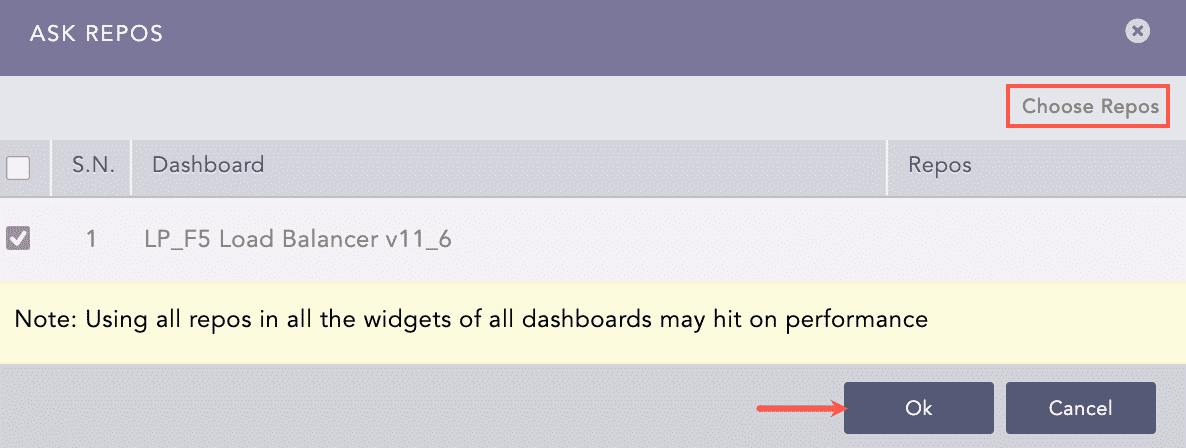
Selecting Repos
Select the repo configured to store the BIG-IP logs and click Done.
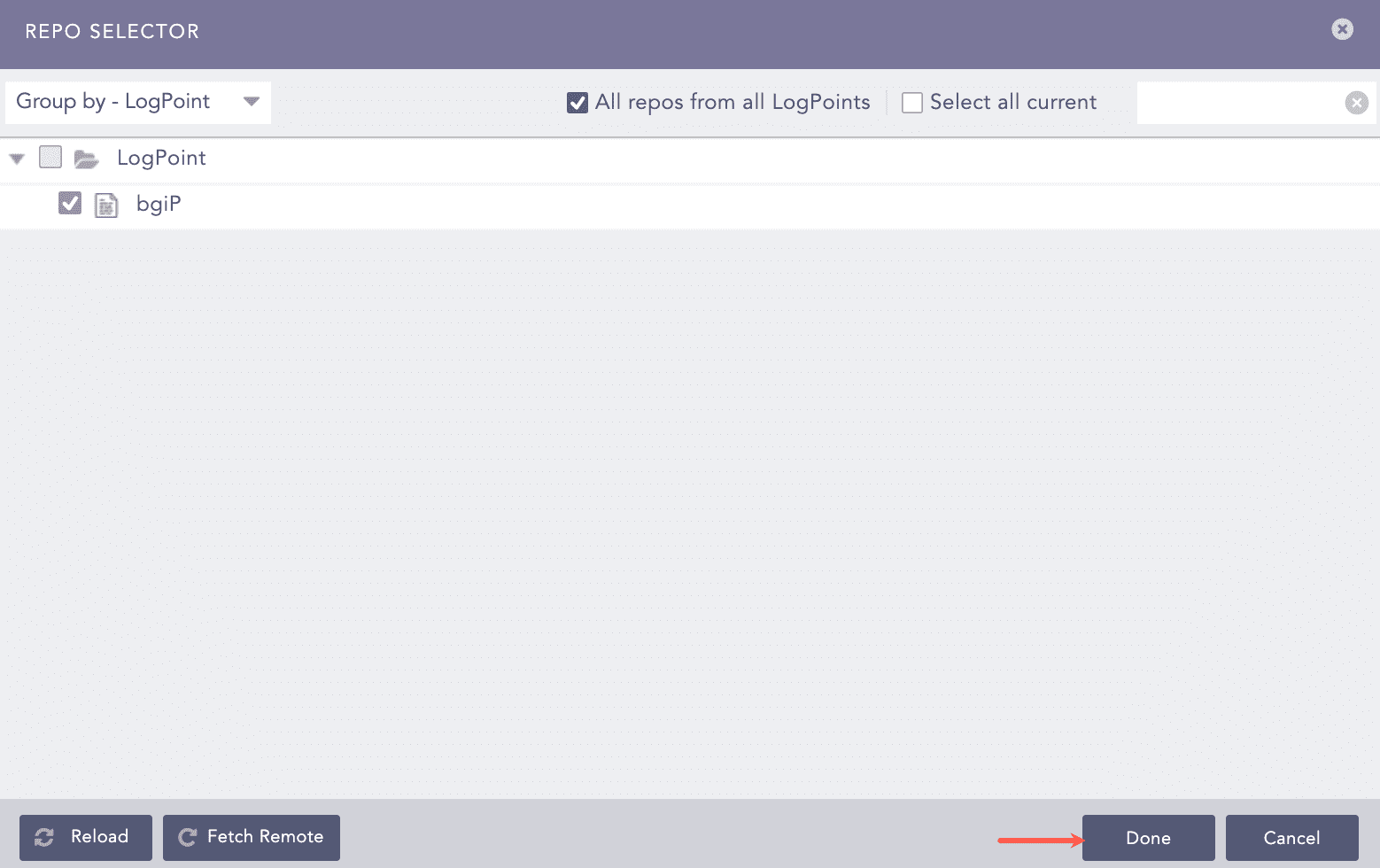
Selecting Repos
Select the dashboard and click Ok.
You can find the BIG-IP dashboards under Dashboards.
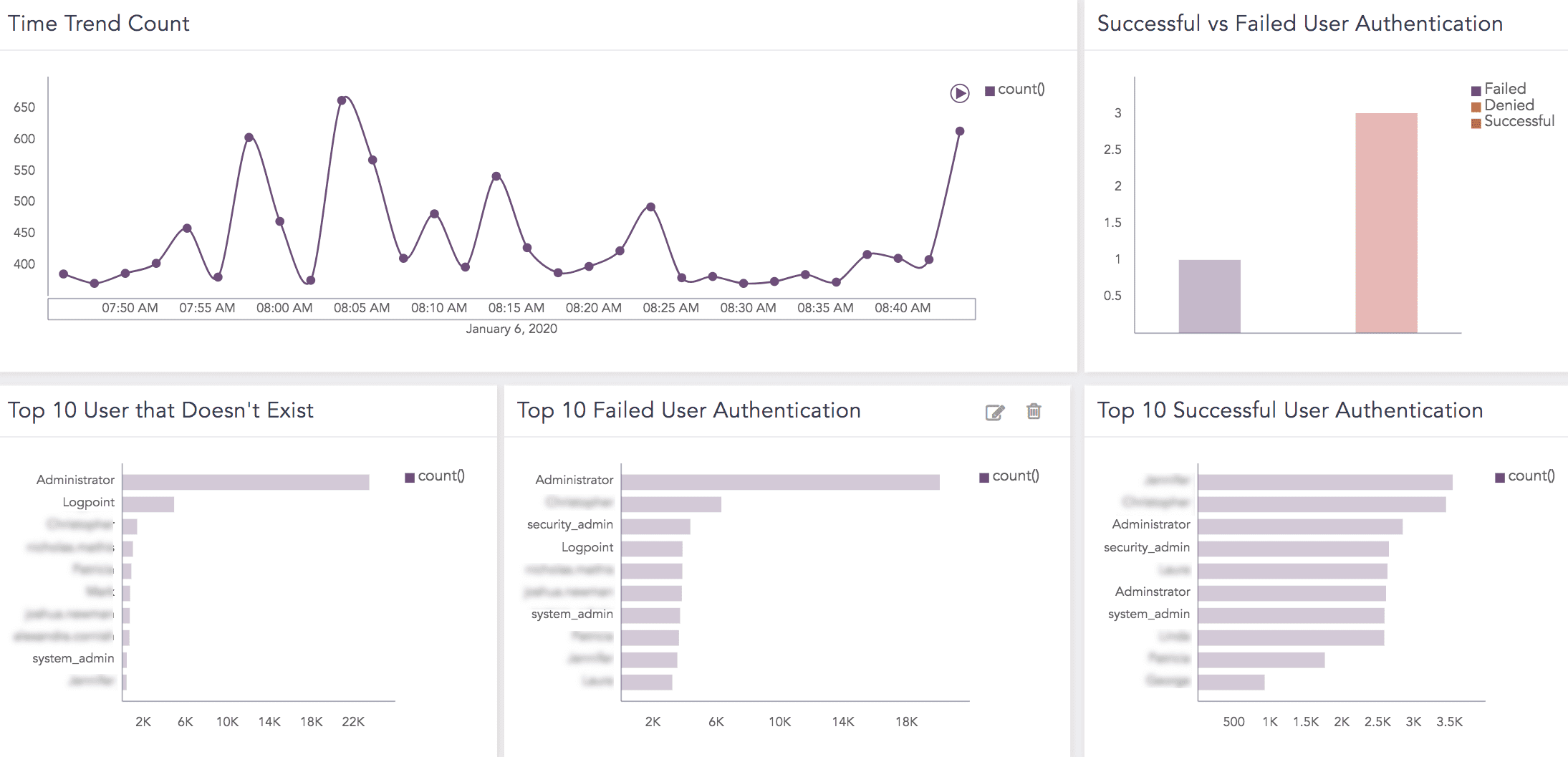
BIG-IP Dashboard
Labels available in LP_F5 Load Balancer v11_4_1 are:
LABELS |
DESCRIPTION |
|---|---|
Server,Error,Network,Authentication,Require |
Events with the 511 server status. |
Server,Error,HTTP,Version,Not,Support |
Events with the 505 server status. |
Server,Error,Gateway,Timeout |
Events with the 504 server status. |
Server,Error,Service,Unavailable |
Events with the 503 server status. |
Server,Error,Bad,Gateway |
Events with the 502 server status. |
Internal,Server,Error |
Events with the 500 server status. |
Client,Error,Expectation,Fail |
Events with the 416 server status. |
Client,Error,Media,Type,Not,Support |
Events with the 415 server status. |
Client,Error,Request,URL,Too,Long |
Events with the 414 server status. |
Client,Error,Precondition,Fai |
Events with the 412 server status. |
Client,Error,Length,Require |
Events with the 411 server status. |
Client,Error,Conflict |
Events with the 409 server status. |
Client,Error,Request,Timeout |
Events with the 408 server status. |
Client,Error,Proxy,Authentication,Require |
Events with the 407 server status. |
Client,Error,Not,Accept |
Events with the 406 server status. |
Client,Error,Method,Not,Allow |
Events with the 405 server status. |
Client,Error,Not,Find |
Events with the 404 server status. |
Client,Error,Forbidden |
Events with the 403 server status. |
Client,Error,Authorization,Fail |
Events with the 401 server status. |
Client,Error,Bad,Request |
Events with the 400 server status. |
Permanent,Redirect |
Events with the 308 server status. |
Temporary,Redirect |
Events with the 307 server status. |
Unused,Response,Code |
Events with the 306 server status. |
Use,Proxy |
Events with the 305 server status. |
Cache,Not,Modify |
Events with the 304 server status. |
Redirect,Other,URL |
Events with the 303 server status. |
Request,Resource,Not,Change |
Events with the 302 server status. |
Request,Resource,Change |
Events with the 301 server status. |
Multiple,Choice |
Events with the 300 server status. |
Partial,Content |
Events with the 206 server status. |
Reset,Content |
Events with the 205 server status. |
Empty,Content |
Events with the 204 server status. |
Not,Authoritative,Information |
Events with the 203 server status. |
Successful,Response,Create |
Events with the 201 server status. |
Request,Successful |
Events with the 200 server status. |
Labels available in LP_F5 Load Balancer are:
LABELS |
DESCRIPTION |
|---|---|
User,Create,Successful |
Events with the create action, the Command Ok status and the userdb_entry string in raw log. |
Delete,User,Successful |
Events with the obj_delete action, the Command Ok status and the userdb_entry string in raw log. |
Create,User,Role,Successful |
Events with the create action, the Command Ok status and the user_role_partition string. |
Change,Audit,Service,Stop,Successful |
Events with the modify action, the Command Ok status and the db_variable string for config*auditing db_variable_name with disable db_variable_value in raw log. |
Change,Audit,Service,Start,Successful |
Events with the modify action, the Command Ok status and the db_variable string for config*auditing db_variable_name with enable db_variable_value in raw log. |
Modify,Audit,Setting,Successful |
Events with the modify action, the Command Ok status and the db_variable string for config*auditing db_variable_name with verbose db_variable_value in raw log. |
Change,User,Successful |
Events with the modify action, the Command Ok status and the userdb_entry string in all values of -userdb_entry_passwd in raw log. |
Change,User,Password,Successful |
Events with the modify action, the Command Ok status and the userdb_entry string in all values of userdb_entry_passwd in raw log. |
Delete,User,Role,Successful |
Events with the obj_delete action, the Command Ok status and the user_role_partition string in all values of user_role_partition_partition in raw log. |